> For the complete documentation index, see [llms.txt](https://maurvan.gitbook.io/ctf-writeups/llms.txt). Markdown versions of documentation pages are available by appending `.md` to page URLs; this page is available as [Markdown](https://maurvan.gitbook.io/ctf-writeups/various-challenges/index/kerberos-authentication.md).
# Kerberos - Authentication
## Challenge
> You have been asked by Cat Corporation’s SOC team to retrieve a user’s password linked to a suspicious Kerberos connection.
>
> Flag format : `RM{user@DomainName:password}`
And the corresponding zip file:
{% file src="/files/A3VwRMlfLtGAFOYfVDJX" %}
## Solution
As we open the archive, we can see we're dealing with a pcapng file. This means we will be using Wireshark and looking at the information we received, we're going to search for a Kerberos connection.
After filtering we end up with 7 frames.
Looking at the first one, we already find something really interesting. Namely, a user: william.dupond and a domain name: CATCORP.LOCAL.
Now we only have the password left to find !
If you're not familiar with Kerberos and AR-REQ Roasting, I recommend reading some more about it. But basically if you use Kerberos, you will send an AS-REQ to the authentication service. This message includes sensitive data, with segments encrypted using the user's password hash.
Knowing this, when we look at the AS-REQ frame, we can indeed find a very interesting hash.
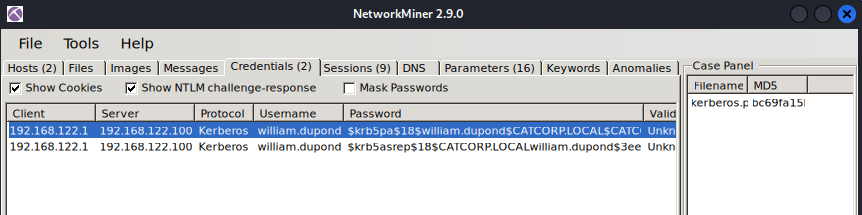
Alternatively, we could also have used [NetworkMiner](https://www.netresec.com/?page=Blog\&month=2014-02\&post=HowTo-install-NetworkMiner-in-Ubuntu-Fedora-and-Arch-Linux) (a network forensics tool). You just open the pcap file with it, then check the "Credentials" tab and it's the first entry.
We can now try to crack this hash using JohnTheRipper or HashCat.
Note: Kerberos uses a specific format so make sure your hash looks like this before attempting to crack it.
```
$krb5pa$18$william.dupond$CATCORP.LOCAL$fc8bbe22b2c967b222ed73dd7616ea71b2ae0c1b0c3688bfff7fecffdebd4054471350cb6e36d3b55ba3420be6c0210b2d978d3f51d1eb4f
```
So that means our flag is: RM{:kittycat12}